Export data via REST API
Create Token
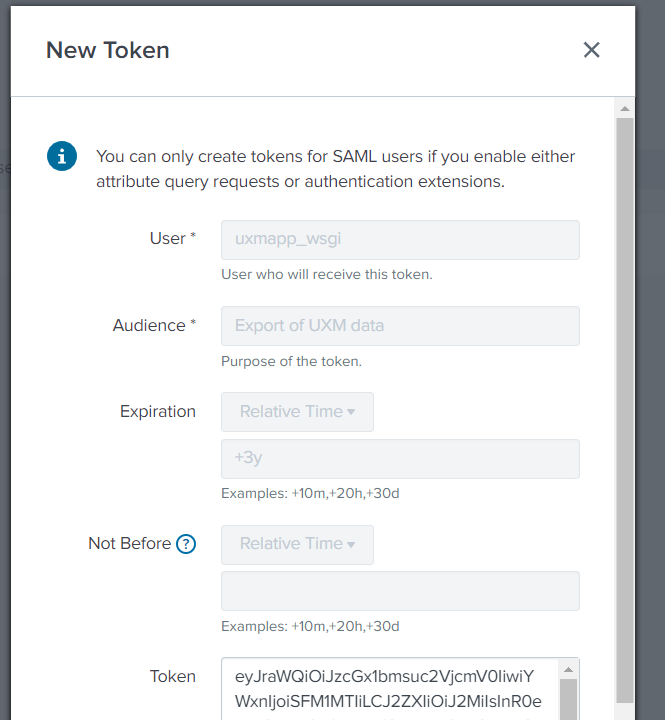
Open Settings -> Tokens and press New Token
Fill out the questions and press "Create".
- User: uxmapp_wsgi
- Audience: Export of UXM data
- Expiry date: +3y
Copy the generated token code and save it, needs to be added to the custom powershell.
Ensure REST service port is accessible
By default Splunk hosts it's REST API on port 8089, this port can be opened up or a reverse proxy can be setup to forward the data to the local port.
UXM Cloud: Please contact us to get the reverse proxy set
NGINX reverse proxy example that only expose the searches from uxmapp:
location /servicesNS/nobody/uxmapp/search/jobs/export {
proxy_pass_request_headers on;
proxy_set_header x-real-IP $remote_addr;
proxy_set_header x-forwarded-for $proxy_add_x_forwarded_for;
proxy_set_header host $host;
proxy_pass https://10.132.0.66:8089/servicesNS/nobody/uxmapp/search/jobs/export;
}
Create report Goto Settings -> "Searches, reports and alerts", Create new report or enable one of the existing "Export - *" reports.
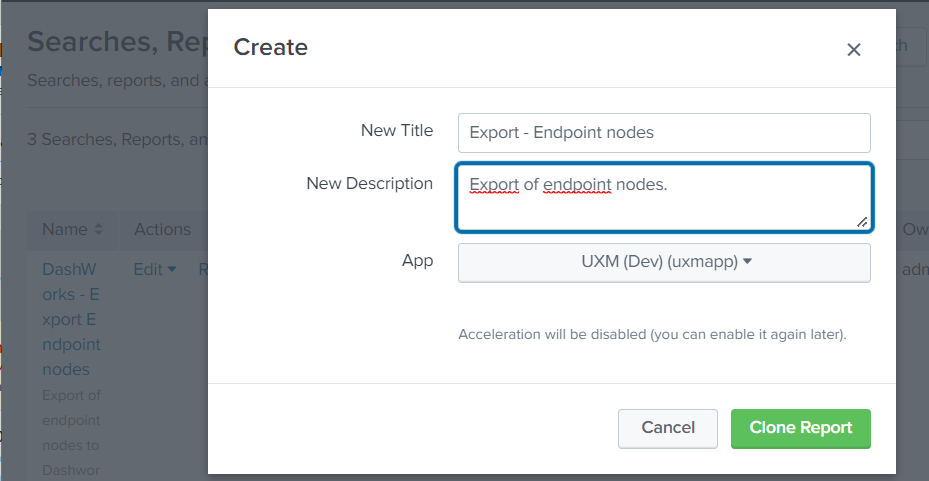
Example SPL to query endpoint nodes and scores, union has been used to merge KVStore and Metric Store data. (join is avoided because it's limited to 50.000 rows)
| union
[| inputlookup ux_nodes_lookup | fields *]
[| mstats latest(uxm.endpoint.score.avg) AS score_avg, latest(uxm.endpoint.score.latency) AS score_latency, latest(uxm.endpoint.score.processor_time) AS score_cpu, latest(uxm.endpoint.score.memory_usage) AS score_memory_usage, latest(uxm.endpoint.score.disk_os_usage) AS score_disk_os_usage, latest(uxm.endpoint.score.logon_duration) AS score_logon_duration
WHERE `getIndexMetrics` BY lookup_key ]
| stats last(active_user) AS "active_user",last(active_username) AS "active_username",last(batteries) AS "batteries",last(battery_device_name) AS "battery_device_name",last(battery_manufacturer_name) AS "battery_manufacturer_name",last(battery_serial_number) AS "battery_serial_number",last(battery_wear_level) AS "battery_wear_level",last(browsers) AS "browsers",last(chassis_sku_number) AS "chassis_sku_number",last(city) AS "city",last(connection_type) AS "connection_type",last(country) AS "country",last(country_name) AS "country_name",last(cpu_clock_frequency) AS "cpu_clock_frequency",last(cpu_cores) AS "cpu_cores",last(cpu_generation) AS "cpu_generation",last(cpu_logical_processors) AS "cpu_logical_processors",last(cpu_model) AS "cpu_model",last(cpu_sockets) AS "cpu_sockets",last(dns) AS "dns",last(domain) AS "domain",last(enabled) AS "enabled",last(hostname) AS "hostname",last(identifying_number) AS "identifying_number",last(internal_ip) AS "internal_ip",last(internal_mac_address) AS "internal_mac_address",last(is_64bit) AS "is_64bit",last(last_boottime) AS "last_boottime",last(last_logon) AS "last_logon",last(last_registration) AS "last_registration",last(location) AS "location",last(log_files_requested) AS "log_files_requested",last(machine_uuid) AS "machine_uuid",last(manufacturer) AS "manufacturer",last(memory_mb) AS "memory_mb",last(model) AS "model",last(os) AS "os",last(os_codename) AS "os_codename",last(os_edition) AS "os_edition",last(os_service_pack) AS "os_service_pack",last(os_version) AS "os_version",last(powerplan) AS "powerplan",last(powerplan_description) AS "powerplan_description",last(powerplan_instance_id) AS "powerplan_instance_id",last(product_caption) AS "product_caption",last(product_name) AS "product_name",last(product_uuid) AS "product_uuid",last(product_version) AS "product_version",last(proxy) AS "proxy",last(public_ip) AS "public_ip",last(release_id) AS "release_id",last(tags) AS "tags",last(type) AS "type",last(vendor) AS "vendor",last(version) AS "version",last(warranty_end) AS "warranty_end",last(warranty_start) AS warranty_start, avg(score_avg) AS score_avg, avg(score_cpu) AS score_cpu, avg(score_memory_usage) AS score_memory_usage, avg(score_disk_os_usage) AS score_disk_os_usage, avg(score_logon_duration) AS score_logon_duration by lookup_key
| fillnull value=10 score_avg
Powershell example to fetch data
Create file export_endpoint_info.ps1 and add the following code:
Update values:
server: Server to query data from searchName: Saved search to execute and return data from. token: Token created in the begining of this guide.
# This will allow for self-signed SSL certs to work
[System.Net.ServicePointManager]::ServerCertificateValidationCallback = { $true }
[System.Net.ServicePointManager]::SecurityProtocol = [System.Net.SecurityProtocolType]::Tls12

$server = "customername.uxmapp.com"
$searchName = "Export - Endpoint nodes"
$appName = "uxmapp"
$token = "eyJraWQ...OYmg"
$headers = @{
    Authorization="Bearer $token"
}

$url = "https://${server}/servicesNS/nobody/$appName/search/jobs/export"
$search = "| savedsearch ""$searchName"""
Write-Host "Fetching data from $url"

$body = @{
    search = $search
    output_mode = "csv" # json or csv
    earliest_time = "-7d@d"
    latest_time = "now"
}

Invoke-RestMethod -ContentType application/json -Method Post -Uri $url -Body $body -Headers $headers -TimeoutSec 60